连通分量标记
连通分量标记(也称为连通分量分析、斑点提取、区域标记、斑点发现或区域提取)为图像中的连通分量赋予唯一的标签。标记过程从左上到右下逐像素扫描图像,以识别连通的像素区域,即共享同一组强度值的相邻像素区域。例如,让我们在这幅图像中查找对象:

要识别该图像中的对象,使用以下命令:
magick objects.gif -connected-components 4 -auto-level -depth 8 objects.png
检测到的对象会被赋予唯一的标签。使用 auto level 可将检测到的对象可视化:
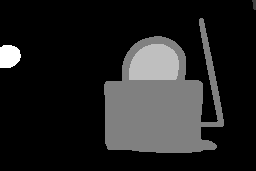
对象统计信息有助于查看。要显示它们,使用以下命令:
magick objects.gif -define connected-components:verbose=true -connected-components 4 objects.png
在源图像中检测到 5 个对象,统计信息如下:
Objects (id: bounding-box centroid area mean-color):
  0: 256x171+0+0 119.2,80.8 33117 srgb(0,0,0)
  2: 120x135+104+18 159.5,106.5 8690 srgb(255,255,255)
  3: 50x36+129+44 154.2,63.4 1529 srgb(0,0,0)
  4: 21x23+0+45 8.8,55.9 409 srgb(255,255,255)
  1: 4x10+252+0 253.9,4.1 31 srgb(255,255,255)
要显示不带表头行的对象,添加 -define connected-components:exclude-header=true。添加 -define connected-components:exclude-ids=true。要对 verbose 的连通分量对象排序,使用 -define connected-components:sort=area | width | height | x | y。默认情况下,对象按面积降序列出。要指定排序顺序,添加 -define connected-components:sort-order=increasing | decreasing。
要访问 8 邻域而不是 4 邻域,使用 -connected-components 8。默认情况下,邻域颜色必须完全一致才能成为同一唯一对象的一部分。要将颜色相近的像素纳入某个对象,使用 -fuzz 选项。
你可能希望通过将小对象与其较大的邻域合并来消除它们。若是如此,使用以下命令:
magick objects.gif -define connected-components:area-threshold=410 -connected-components 4 \
  -auto-level objects.jpg
以下是预期的结果。注意,小对象现在已与背景合并。

注意其中两个对象被合并,剩下三个对象:
Objects (id: bounding-box centroid area mean-color):
  0: 256x171+0+0 118.0,80.4 33557 srgb(0,0,0)
  2: 120x135+104+18 159.5,106.5 8690 srgb(255,255,255)
  3: 50x36+129+44 154.2,63.4 1529 srgb(0,0,0)
默认情况下,标记后的图像是灰度图。你也可以改为用源图像中的 mean-color 替换标记图像中的对象颜色。只需在命令行中添加这个设置 -define connected-components:mean-color=true。
阈值可以选择性地包含范围,例如 -define connected-components:area-threshold=410-1600。要保留背景对象,用 -define connected-components:background-id=object-id 来标识它。默认的背景对象是面积最大的对象。
除了 area 之外,还支持以下阈值指标:
- connected-components:angle-threshold(来自等价椭圆)
- connected-components:circularity-threshold(4piarea/perimeter^2)
- connected-components:diameter-threshold(sqrt(4*area/pi))
- connected-components:eccentricity-threshold(来自等价椭圆)
- connected-components:major-axis-threshold(来自等价椭圆的直径)
- connected-components:minor-axis-threshold(来自等价椭圆的直径)
- connected-components:perimeter-threshold
你可能希望移除某些对象。使用 -define connected-components:remove-ids=list-of-ids(例如 -define connected-components:remove-ids=2,4-5)。或者使用 -define connected-components:keep-ids=list-of-ids 来保留这些对象并合并其余所有对象。为方便起见,你可以在保留背景对象的同时保留排名靠前的对象,使用此选项: -define connected-components:keep-top=number-of-objects。除了对象 id,你也可以改为移除或保留按颜色标识的对象,例如 -define connected-components:keep-colors=red;green;blue。
图像中的对象看起来可能是均匀的,但其颜色值略有不同。默认情况下,只有完全匹配的像素才会被视为某个特定对象的一部分。对于对象内部颜色的轻微变化,使用 -fuzz。例如,
magick star-map.png -fuzz 5% -define connected-components:verbose=true \
  -define connected-components:mean-color=true -connected-components 4 stars.gif
连通分量
算法以通常的行列顺序遍历某个分量的像素,查找上方或左侧的分量。对于左上角的分量,没有可合并的上方或左侧分量。因此,存在一些特殊情形,你需要先旋转,重复连通分量处理,然后再旋转回来。例如,
 magick  \
  objects.gif  \
  -define connected-components:verbose=true \
  -define connected-components:area-threshold=6000 \
  -virtual-pixel None \
  -connected-components 4 -rotate 180 \
  -connected-components 4 -rotate -180 \
  objects.png