Magick 矢量图形
MVG 概述 • 绘图基元
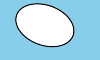
本规范定义了 Magick Vector Graphics(MVG)的功能与语法。MVG 是一种模块化语言,用于在 ImageMagick 中描述二维矢量图形以及矢量/栅格混合图形。你可以使用该语言从命令行、从 MVG 文件、从 SVG(Scalable Vector Graphics)文件,或从某个 ImageMagick 程序接口进行绘制。例如,使用以下命令绘制一段弧:
$ magick -size 100x60 canvas:skyblue -fill white -stroke black \
  -draw "path 'M 30,40  A 30,20  20  0,0 70,20 A 30,20  20  1,0 30,40 Z '" \
  arc.png
结果如下:
当绘图变得足够复杂时,我们建议你把图形基元汇集到一个 MVG 文件中。在本例中,我们使用 piechart.mvg:
push graphic-context
  viewbox 0 0 624 369
  affine 0.283636 0 0 0.283846 -0 -0
  push graphic-context
    push graphic-context
      fill 'darkslateblue'
      stroke 'blue'
      stroke-width 1
      rectangle 1,1 2199,1299
    pop graphic-context
    push graphic-context
      font-size 40
      fill 'white'
      stroke-width 1
      text 600,1100 'Average: 20.0'
    pop graphic-context
    push graphic-context
      fill 'red'
      stroke 'black'
      stroke-width 5
      path 'M700.0,600.0 L340.0,600.0 A360.0,360.0 0 0,1 408.1452123287954,389.2376150414973 z'
    pop graphic-context
    push graphic-context
      font-size 40
      fill 'white'
      stroke-width 1
      text 1400,140 'MagickWand for PHP'
    pop graphic-context
    push graphic-context
      font-size 30
      fill 'white'
      stroke-width 1
      text 1800,140 '(10.0%)'
    pop graphic-context
    push graphic-context
      fill 'red'
      stroke 'black'
      stroke-width 4
      rectangle 1330,100 1370,140
    pop graphic-context
    push graphic-context
      fill 'yellow'
      stroke 'black'
      stroke-width 5
      path 'M700.0,600.0 L408.1452123287954,389.2376150414973 A360.0,360.0 0 0,1 976.5894480359858,369.56936567559273 z'
    pop graphic-context
    push graphic-context
      font-size 40
      fill 'white'
      stroke-width 1
      text 1400,220 'MagickCore'
    pop graphic-context
    push graphic-context
      font-size 30
      fill 'white'
      stroke-width 1
      text 1800,220 '(29.0%)'
    pop graphic-context
    push graphic-context
      fill 'yellow'
      stroke 'black'
      stroke-width 4
      rectangle 1330,180 1370,220
    pop graphic-context
    push graphic-context
      fill 'fuchsia'
      stroke 'black'
      stroke-width 5
      path 'M700.0,600.0 L976.5894480359858,369.56936567559273 A360.0,360.0 0 0,1 964.2680466142854,844.4634932636567 z'
    pop graphic-context
    push graphic-context
      font-size 40
      fill 'white'
      stroke-width 1
      text 1400,300 'MagickWand'
    pop graphic-context
    push graphic-context
      font-size 30
      fill 'white'
      stroke-width 1
      text 1800,300 '(22.9%)'
    pop graphic-context
    push graphic-context
      fill 'fuchsia'
      stroke 'black'
      stroke-width 4
      rectangle 1330,260 1370,300
    pop graphic-context
    push graphic-context
      fill 'blue'
      stroke 'black'
      stroke-width 5
      path 'M700.0,600.0 L964.2680466142854,844.4634932636567 A360.0,360.0 0 0,1 757.853099990584,955.3210081341651 z'
    pop graphic-context
    push graphic-context
      font-size 40
      fill 'white'
      stroke-width 1
      text 1400,380 'JMagick'
    pop graphic-context
    push graphic-context
      font-size 30
      fill 'white'
      stroke-width 1
      text 1800,380 '(10.6%)'
    pop graphic-context
    push graphic-context
      fill 'blue'
      stroke 'black'
      stroke-width 4
      rectangle 1330,340 1370,380
    pop graphic-context
    push graphic-context
      fill 'lime'
      stroke 'black'
      stroke-width 5
      path 'M700.0,600.0 L757.853099990584,955.3210081341651 A360.0,360.0 0 0,1 340.0,600.0 z'
    pop graphic-context
    push graphic-context
      font-size 40
      fill 'white'
      stroke-width 1
      text 1400,460 'Magick++'
    pop graphic-context
    push graphic-context
      font-size 30
      fill 'white'
      stroke-width 1
      text 1800,460 '(27.5%)'
    pop graphic-context
    push graphic-context
      fill 'lime'
      stroke 'black'
      stroke-width 4
      rectangle 1330,420 1370,460
    pop graphic-context
    push graphic-context
      font-size 100
      fill 'white'
      stroke-width 1
      text 100,150 'ImageMagick'
    pop graphic-context
    push graphic-context
      fill 'none'
      stroke 'black'
      stroke-width 5
      circle 700,600 700,960
    pop graphic-context
  pop graphic-context
pop graphic-context
使用以下命令渲染饼图:
$ magick mvg:piechart.mvg piechart.png
它会生成如下渲染结果:
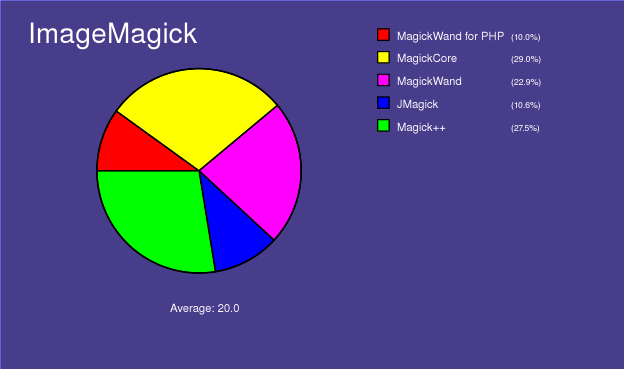
不过一般来说,MVG 用起来相当困难,因此你大概会更愿意用程序来生成 SVG 格式的图形。ImageMagick 会自动把 SVG 转换为 MVG 并渲染图像,例如,我们用以下命令渲染 piechart.svg:

$ magick mvg:piechart.svg piechart.jpg
这会生成与我们用 MVG 语言创建的相同的饼图。
许多 ImageMagick 程序接口也提供绘图功能。ImageMagick 会把绘图 API 调用转换为 MVG 并渲染。下面是用 MagickWand 语言编写的示例代码:
(void) PushDrawingWand(draw_wand);
{
  const PointInfo points[6] =
  {
    { 180,504 },
    { 282.7,578.6 },
    { 243.5,699.4 },
    { 116.5,699.4 },
    { 77.26,578.6 },
    { 180,504 }
  };

  DrawSetStrokeAntialias(draw_wand,True);
  DrawSetStrokeWidth(draw_wand,9);
  DrawSetStrokeLineCap(draw_wand,RoundCap);
  DrawSetStrokeLineJoin(draw_wand,RoundJoin);
  (void) DrawSetStrokeDashArray(draw_wand,0,(const double *)NULL);
  (void) PixelSetColor(color,"#4000c2");
  DrawSetStrokeColor(draw_wand,color);
  DrawSetFillRule(draw_wand,EvenOddRule);
  (void) PixelSetColor(color,"#800000");
  DrawSetFillColor(draw_wand,color);
  DrawPolygon(draw_wand,6,points);
}
(void) PopDrawingWand(draw_wand);
MVG 概述
MVG 会忽略命令之间的所有空白。这样就能在一行中写入多条 MVG 命令。为了让 MVG 更易于编辑和阅读,通常约定用换行符结束每条 MVG 命令。本语法说明在 MVG 序列中使用缩进以帮助理解。缩进受支持,但并非必需。
元文件包装语法(用于支持独立的 MVG 文件):
push graphic-context
  viewbox 0 0 width height
  [ any other MVG commands ]
pop graphic-context
图案语法(保存和恢复上下文):
push pattern id x,y width,height
 push graphic-context
  [ drawing commands ]
 pop graphic-context
pop pattern
示例(%s 是标识符字符串):
push defs
 push pattern %s 10,10 20,20
  push graphic-context
   fill red
   rectangle 5,5 15,15
  pop graphic-context
  push graphic-context
   fill green
   rectangle 10,10 20,20
  pop graphic-context
 pop pattern
pop defs
图像平铺使用:
push pattern id x,y width,height
 image Copy ...
pop pattern
注意,可以像下面这样把图案用于 fill 或 stroke:
stroke url(#%s)
或
fill url(#%s)
裁剪路径定义了一个裁剪区域,只有其内部的区域才会被绘制。裁剪区域之外的部分会被遮罩。
push defs
 push clip-path "myClipPath"
  push graphic-context
   rectangle 10,10 20,20
  pop graphic-context
 pop clip-path
pop defs
clip-path url(#myClipPath)
绘图基元
以下是 MVG 绘图基元的完整说明:
| 基元 | 说明 | ||||||||||||||||||||||||||||||||||||||||||||||||||||||||||||||
|---|---|---|---|---|---|---|---|---|---|---|---|---|---|---|---|---|---|---|---|---|---|---|---|---|---|---|---|---|---|---|---|---|---|---|---|---|---|---|---|---|---|---|---|---|---|---|---|---|---|---|---|---|---|---|---|---|---|---|---|---|---|---|---|
| affine sx,rx,ry,sy,tx,ty | |||||||||||||||||||||||||||||||||||||||||||||||||||||||||||||||
| arc x0,y0 x1,y1 a0,a1 | |||||||||||||||||||||||||||||||||||||||||||||||||||||||||||||||
| bezier x0,y0 ... xn,yn | Bezier(样条)曲线需要三个或更多 x,y 坐标来定义其形状。第一个点和最后一个点是节点(被保留的坐标),任何中间坐标都是控制点。如果指定了两个控制点,则每个端节点与其依次对应的控制点之间的连线决定该端处曲线的切线方向。如果指定了一个控制点,则从端节点到该唯一控制点的连线决定两端处曲线的切线方向。如果指定的控制点超过两个,则这些额外的控制点共同作用来决定曲线的中间形状。为了绘制复杂曲线,强烈建议使用 Path 基元,或者绘制多段四点贝塞尔曲线,并在每段后续曲线中重复其起始节点和结束节点。 |
||||||||||||||||||||||||||||||||||||||||||||||||||||||||||||||
| border-color color | |||||||||||||||||||||||||||||||||||||||||||||||||||||||||||||||
| circle originx,originy perimeterx,perimetery | |||||||||||||||||||||||||||||||||||||||||||||||||||||||||||||||
| clip-path url(name) | |||||||||||||||||||||||||||||||||||||||||||||||||||||||||||||||
| clip-rule rule | 从这些规则类型中选择:evenoddnonzero |
||||||||||||||||||||||||||||||||||||||||||||||||||||||||||||||
| clip-units units | 从这些单位类型中选择:userSpaceuserSpaceOnUseobjectBoundingBox |
||||||||||||||||||||||||||||||||||||||||||||||||||||||||||||||
| color x,y method | 从这些方法类型中选择:pointreplacefloodfillfilltoborderreset |
||||||||||||||||||||||||||||||||||||||||||||||||||||||||||||||
| compliance type | 从这些合规类型中选择: MVG 或 SVG | ||||||||||||||||||||||||||||||||||||||||||||||||||||||||||||||
| decorate type | 从这些装饰类型中选择:noneline-throughoverlineunderline |
||||||||||||||||||||||||||||||||||||||||||||||||||||||||||||||
| ellipse centerx,centery radiusx,radiusy arcstart,arcstop | |||||||||||||||||||||||||||||||||||||||||||||||||||||||||||||||
| fill color | 从这些颜色中任选其一。 | ||||||||||||||||||||||||||||||||||||||||||||||||||||||||||||||
| fill-opacity opacity | 不透明度范围为 0.0(完全透明)到 1.0(完全不透明),或以百分比表示(例如 50%)。 | ||||||||||||||||||||||||||||||||||||||||||||||||||||||||||||||
| fill-rule rule | 从这些规则类型中选择:evenoddnonzero |
||||||||||||||||||||||||||||||||||||||||||||||||||||||||||||||
| font name | |||||||||||||||||||||||||||||||||||||||||||||||||||||||||||||||
| font-family family | |||||||||||||||||||||||||||||||||||||||||||||||||||||||||||||||
| font-size point-size | |||||||||||||||||||||||||||||||||||||||||||||||||||||||||||||||
| font-stretch type | 从这些拉伸类型中选择:allnormalultra-condensedextra-condensedcondensedsemi-condensedsemi-expandedexpandedextra-expandedultra-expanded |
||||||||||||||||||||||||||||||||||||||||||||||||||||||||||||||
| font-style style | 从这些样式中选择:allnormalitalicoblique |
||||||||||||||||||||||||||||||||||||||||||||||||||||||||||||||
| font-weight weight | 从这些字重中选择:allnormalbold100200300400500600700800900 |
||||||||||||||||||||||||||||||||||||||||||||||||||||||||||||||
| gradient-units units | 从这些单位中选择:userSpaceuserSpaceOnUseobjectBoundingBox |
||||||||||||||||||||||||||||||||||||||||||||||||||||||||||||||
| gravity type | 从这些 gravity 类型中选择:NorthWestNorthNorthEastWestCenterEastSouthWestSouthSouthEast |
||||||||||||||||||||||||||||||||||||||||||||||||||||||||||||||
| image compose x,y width,height 'filename' | 从这些合成操作中选择:
|
||||||||||||||||||||||||||||||||||||||||||||||||||||||||||||||
| interline-spacing pixels | |||||||||||||||||||||||||||||||||||||||||||||||||||||||||||||||
| interword-spacing pixels | |||||||||||||||||||||||||||||||||||||||||||||||||||||||||||||||
| kerning pixels | |||||||||||||||||||||||||||||||||||||||||||||||||||||||||||||||
| line x,y x1,y1 | |||||||||||||||||||||||||||||||||||||||||||||||||||||||||||||||
| matte x,y method | 从这些方法中选择:pointreplacefloodfillfilltoborderreset |
||||||||||||||||||||||||||||||||||||||||||||||||||||||||||||||
| offset offset | |||||||||||||||||||||||||||||||||||||||||||||||||||||||||||||||
| opacity opacity | 使用百分比(例如 50%)。 | ||||||||||||||||||||||||||||||||||||||||||||||||||||||||||||||
| path path | |||||||||||||||||||||||||||||||||||||||||||||||||||||||||||||||
| point x,y | |||||||||||||||||||||||||||||||||||||||||||||||||||||||||||||||
| polygon x,y x1,y1, ..., xn,yn | |||||||||||||||||||||||||||||||||||||||||||||||||||||||||||||||
| polyline x,y x1,y1, ..., xn,yn | |||||||||||||||||||||||||||||||||||||||||||||||||||||||||||||||
| pop clip-path | |||||||||||||||||||||||||||||||||||||||||||||||||||||||||||||||
| pop defs | |||||||||||||||||||||||||||||||||||||||||||||||||||||||||||||||
| pop gradient | |||||||||||||||||||||||||||||||||||||||||||||||||||||||||||||||
| pop graphic-context | |||||||||||||||||||||||||||||||||||||||||||||||||||||||||||||||
| pop pattern | |||||||||||||||||||||||||||||||||||||||||||||||||||||||||||||||
| push clip-path "name" | |||||||||||||||||||||||||||||||||||||||||||||||||||||||||||||||
| push defs | |||||||||||||||||||||||||||||||||||||||||||||||||||||||||||||||
| push gradient id linear x,y x1,y1 | |||||||||||||||||||||||||||||||||||||||||||||||||||||||||||||||
| push gradient id radial xc,cy xf,yf radius | |||||||||||||||||||||||||||||||||||||||||||||||||||||||||||||||
| push graphic-context { "id" } | id 是可选的 | ||||||||||||||||||||||||||||||||||||||||||||||||||||||||||||||
| push pattern id x,y width,height | |||||||||||||||||||||||||||||||||||||||||||||||||||||||||||||||
| rectangle x,y x1,y1 | |||||||||||||||||||||||||||||||||||||||||||||||||||||||||||||||
| rotate angle | |||||||||||||||||||||||||||||||||||||||||||||||||||||||||||||||
| roundrectangle x,y x1,y1 width,height | |||||||||||||||||||||||||||||||||||||||||||||||||||||||||||||||
| scale x,y | |||||||||||||||||||||||||||||||||||||||||||||||||||||||||||||||
| skewX angle | |||||||||||||||||||||||||||||||||||||||||||||||||||||||||||||||
| skewX angle | |||||||||||||||||||||||||||||||||||||||||||||||||||||||||||||||
| stop-color color offset | |||||||||||||||||||||||||||||||||||||||||||||||||||||||||||||||
| stroke color | |||||||||||||||||||||||||||||||||||||||||||||||||||||||||||||||
| stroke-antialias 0 • 1 | |||||||||||||||||||||||||||||||||||||||||||||||||||||||||||||||
| stroke-dasharray none • numeric-list | |||||||||||||||||||||||||||||||||||||||||||||||||||||||||||||||
| stroke-dashoffset offset | |||||||||||||||||||||||||||||||||||||||||||||||||||||||||||||||
| stroke-linecap type | 从这些线帽类型中选择:buttroundsquare |
||||||||||||||||||||||||||||||||||||||||||||||||||||||||||||||
| stroke-linejoin type | 从这些连接类型中选择:bevelmiterround |
||||||||||||||||||||||||||||||||||||||||||||||||||||||||||||||
| stroke-miterlimit limit | |||||||||||||||||||||||||||||||||||||||||||||||||||||||||||||||
| stroke-opacity opacity | 不透明度范围为 0.0(完全透明)到 1.0(完全不透明),或以百分比表示(例如 50%)。 | ||||||||||||||||||||||||||||||||||||||||||||||||||||||||||||||
| stroke-width width | |||||||||||||||||||||||||||||||||||||||||||||||||||||||||||||||
| text "text" | |||||||||||||||||||||||||||||||||||||||||||||||||||||||||||||||
| text-antialias 0 • 1 | |||||||||||||||||||||||||||||||||||||||||||||||||||||||||||||||
| text-undercolor color | |||||||||||||||||||||||||||||||||||||||||||||||||||||||||||||||
| translate x,y | |||||||||||||||||||||||||||||||||||||||||||||||||||||||||||||||
| use "url(#id)" | |||||||||||||||||||||||||||||||||||||||||||||||||||||||||||||||
| viewbox x,y x1,y1 |
注意,基元区分大小写,例如,应使用 viewbox,而非 viewBox。