Magick Vector Graphics
Ringkasan MVG • Primitif grafis
Spesifikasi ini mendefinisikan fitur dan sintaksis Magick Vector Graphics (MVG), bahasa modular untuk mendeskripsikan grafik vektor dua dimensi maupun grafik campuran vektor/raster di ImageMagick. Anda dapat menggunakan bahasa ini untuk menggambar dari baris perintah, dari file MVG, dari file SVG -- Scalable Vector Graphics, atau dari salah satu antarmuka program ImageMagick. Gunakan perintah berikut, misalnya, untuk merender busur:
$ magick -size 100x60 canvas:skyblue -fill white -stroke black \
  -draw "path 'M 30,40  A 30,20  20  0,0 70,20 A 30,20  20  1,0 30,40 Z '" \
  arc.png
dan berikut hasilnya:

Ketika gambar menjadi cukup rumit, kami menyarankan Anda menyusun primitif grafis ke dalam file MVG. Untuk contoh ini, kita menggunakan piechart.mvg:
push graphic-context
  viewbox 0 0 624 369
  affine 0.283636 0 0 0.283846 -0 -0
  push graphic-context
    push graphic-context
      fill 'darkslateblue'
      stroke 'blue'
      stroke-width 1
      rectangle 1,1 2199,1299
    pop graphic-context
    push graphic-context
      font-size 40
      fill 'white'
      stroke-width 1
      text 600,1100 'Average: 20.0'
    pop graphic-context
    push graphic-context
      fill 'red'
      stroke 'black'
      stroke-width 5
      path 'M700.0,600.0 L340.0,600.0 A360.0,360.0 0 0,1 408.1452123287954,389.2376150414973 z'
    pop graphic-context
    push graphic-context
      font-size 40
      fill 'white'
      stroke-width 1
      text 1400,140 'MagickWand for PHP'
    pop graphic-context
    push graphic-context
      font-size 30
      fill 'white'
      stroke-width 1
      text 1800,140 '(10.0%)'
    pop graphic-context
    push graphic-context
      fill 'red'
      stroke 'black'
      stroke-width 4
      rectangle 1330,100 1370,140
    pop graphic-context
    push graphic-context
      fill 'yellow'
      stroke 'black'
      stroke-width 5
      path 'M700.0,600.0 L408.1452123287954,389.2376150414973 A360.0,360.0 0 0,1 976.5894480359858,369.56936567559273 z'
    pop graphic-context
    push graphic-context
      font-size 40
      fill 'white'
      stroke-width 1
      text 1400,220 'MagickCore'
    pop graphic-context
    push graphic-context
      font-size 30
      fill 'white'
      stroke-width 1
      text 1800,220 '(29.0%)'
    pop graphic-context
    push graphic-context
      fill 'yellow'
      stroke 'black'
      stroke-width 4
      rectangle 1330,180 1370,220
    pop graphic-context
    push graphic-context
      fill 'fuchsia'
      stroke 'black'
      stroke-width 5
      path 'M700.0,600.0 L976.5894480359858,369.56936567559273 A360.0,360.0 0 0,1 964.2680466142854,844.4634932636567 z'
    pop graphic-context
    push graphic-context
      font-size 40
      fill 'white'
      stroke-width 1
      text 1400,300 'MagickWand'
    pop graphic-context
    push graphic-context
      font-size 30
      fill 'white'
      stroke-width 1
      text 1800,300 '(22.9%)'
    pop graphic-context
    push graphic-context
      fill 'fuchsia'
      stroke 'black'
      stroke-width 4
      rectangle 1330,260 1370,300
    pop graphic-context
    push graphic-context
      fill 'blue'
      stroke 'black'
      stroke-width 5
      path 'M700.0,600.0 L964.2680466142854,844.4634932636567 A360.0,360.0 0 0,1 757.853099990584,955.3210081341651 z'
    pop graphic-context
    push graphic-context
      font-size 40
      fill 'white'
      stroke-width 1
      text 1400,380 'JMagick'
    pop graphic-context
    push graphic-context
      font-size 30
      fill 'white'
      stroke-width 1
      text 1800,380 '(10.6%)'
    pop graphic-context
    push graphic-context
      fill 'blue'
      stroke 'black'
      stroke-width 4
      rectangle 1330,340 1370,380
    pop graphic-context
    push graphic-context
      fill 'lime'
      stroke 'black'
      stroke-width 5
      path 'M700.0,600.0 L757.853099990584,955.3210081341651 A360.0,360.0 0 0,1 340.0,600.0 z'
    pop graphic-context
    push graphic-context
      font-size 40
      fill 'white'
      stroke-width 1
      text 1400,460 'Magick++'
    pop graphic-context
    push graphic-context
      font-size 30
      fill 'white'
      stroke-width 1
      text 1800,460 '(27.5%)'
    pop graphic-context
    push graphic-context
      fill 'lime'
      stroke 'black'
      stroke-width 4
      rectangle 1330,420 1370,460
    pop graphic-context
    push graphic-context
      font-size 100
      fill 'white'
      stroke-width 1
      text 100,150 'ImageMagick'
    pop graphic-context
    push graphic-context
      fill 'none'
      stroke 'black'
      stroke-width 5
      circle 700,600 700,960
    pop graphic-context
  pop graphic-context
pop graphic-context
untuk merender diagram lingkaran dengan perintah berikut:
$ magick mvg:piechart.mvg piechart.png
yang menghasilkan rendering berikut:
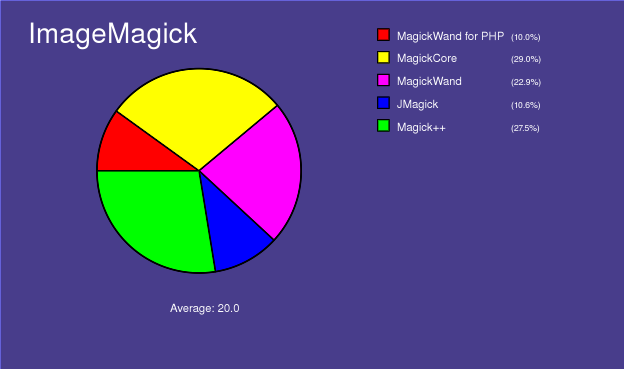
Namun demikian, secara umum MVG cukup sulit untuk dikerjakan langsung sehingga Anda mungkin lebih memilih menggunakan program untuk menghasilkan grafik dalam format SVG. ImageMagick secara otomatis mengonversi SVG ke MVG lalu merender gambar Anda; sebagai contoh, kita merender piechart.svg dengan perintah berikut:

$ magick mvg:piechart.svg piechart.jpg
untuk menghasilkan diagram lingkaran yang sama seperti yang kita buat dengan bahasa MVG.
Penggambaran juga tersedia dari banyak antarmuka program ImageMagick. ImageMagick mengonversi panggilan API penggambaran ke MVG lalu merendernya. Berikut contoh kode yang ditulis dalam bahasa MagickWand:
(void) PushDrawingWand(draw_wand);
{
  const PointInfo points[6] =
  {
    { 180,504 },
    { 282.7,578.6 },
    { 243.5,699.4 },
    { 116.5,699.4 },
    { 77.26,578.6 },
    { 180,504 }
  };

  DrawSetStrokeAntialias(draw_wand,True);
  DrawSetStrokeWidth(draw_wand,9);
  DrawSetStrokeLineCap(draw_wand,RoundCap);
  DrawSetStrokeLineJoin(draw_wand,RoundJoin);
  (void) DrawSetStrokeDashArray(draw_wand,0,(const double *)NULL);
  (void) PixelSetColor(color,"#4000c2");
  DrawSetStrokeColor(draw_wand,color);
  DrawSetFillRule(draw_wand,EvenOddRule);
  (void) PixelSetColor(color,"#800000");
  DrawSetFillColor(draw_wand,color);
  DrawPolygon(draw_wand,6,points);
}
(void) PopDrawingWand(draw_wand);
Ringkasan MVG
MVG mengabaikan semua whitespace di antara perintah. Hal ini memungkinkan beberapa perintah MVG ditulis dalam satu baris. Sudah menjadi konvensi umum untuk mengakhiri setiap perintah MVG dengan baris baru agar MVG lebih mudah diedit dan dibaca. Deskripsi sintaksis ini menggunakan indentasi pada urutan MVG untuk membantu pemahaman. Indentasi didukung, tetapi tidak wajib.
Sintaksis wrapper metafile (untuk mendukung file MVG mandiri):
push graphic-context
  viewbox 0 0 width height
  [ any other MVG commands ]
pop graphic-context
Sintaksis pola (menyimpan dan memulihkan konteks):
push pattern id x,y width,height
 push graphic-context
  [ drawing commands ]
 pop graphic-context
pop pattern
berikut contohnya (%s adalah string identifier):
push defs
 push pattern %s 10,10 20,20
  push graphic-context
   fill red
   rectangle 5,5 15,15
  pop graphic-context
  push graphic-context
   fill green
   rectangle 10,10 20,20
  pop graphic-context
 pop pattern
pop defs
Untuk tiling gambar, gunakan:
push pattern id x,y width,height
 image Copy ...
pop pattern
Perhatikan bahwa Anda dapat menggunakan pola tersebut baik untuk fill maupun stroke, seperti:
stroke url(#%s)
atau
fill url(#%s)
Clip path mendefinisikan area clip, dan hanya bagian di dalamnya yang akan digambar. Area di luar area clip akan disembunyikan (masked).
push defs
 push clip-path "myClipPath"
  push graphic-context
   rectangle 10,10 20,20
  pop graphic-context
 pop clip-path
pop defs
clip-path url(#myClipPath)
Primitif grafis
Berikut deskripsi lengkap primitif grafis MVG:
| Primitif | Deskripsi | ||||||||||||||||||||||||||||||||||||||||||||||||||||||||||||||
|---|---|---|---|---|---|---|---|---|---|---|---|---|---|---|---|---|---|---|---|---|---|---|---|---|---|---|---|---|---|---|---|---|---|---|---|---|---|---|---|---|---|---|---|---|---|---|---|---|---|---|---|---|---|---|---|---|---|---|---|---|---|---|---|
| affine sx,rx,ry,sy,tx,ty | |||||||||||||||||||||||||||||||||||||||||||||||||||||||||||||||
| arc x0,y0 x1,y1 a0,a1 | |||||||||||||||||||||||||||||||||||||||||||||||||||||||||||||||
| bezier x0,y0 ... xn,yn | Bezier (spline) membutuhkan tiga atau lebih koordinat x,y untuk mendefinisikan bentuknya. Titik pertama dan terakhir adalah knot (koordinat yang dipertahankan), dan koordinat perantara mana pun adalah titik kontrol. Jika dua titik kontrol ditentukan, garis antara setiap knot ujung dan titik kontrol yang berpasangan dengannya secara berurutan menentukan arah garis singgung kurva pada ujung tersebut. Jika satu titik kontrol ditentukan, garis dari knot ujung ke satu titik kontrol tersebut menentukan arah garis singgung kurva pada masing-masing ujung. Jika lebih dari dua titik kontrol ditentukan, titik kontrol tambahan bekerja secara kombinasi untuk menentukan bentuk perantara kurva. Untuk menggambar kurva kompleks, sangat disarankan untuk menggunakan primitif Path, atau menggambar beberapa segmen bezier empat titik dengan knot awal dan akhir dari setiap segmen berurutan diulang. |
||||||||||||||||||||||||||||||||||||||||||||||||||||||||||||||
| border-color color | |||||||||||||||||||||||||||||||||||||||||||||||||||||||||||||||
| circle originx,originy perimeterx,perimetery | |||||||||||||||||||||||||||||||||||||||||||||||||||||||||||||||
| clip-path url(name) | |||||||||||||||||||||||||||||||||||||||||||||||||||||||||||||||
| clip-rule rule | Pilih dari jenis aturan berikut:evenoddnonzero |
||||||||||||||||||||||||||||||||||||||||||||||||||||||||||||||
| clip-units units | Pilih dari jenis satuan berikut:userSpaceuserSpaceOnUseobjectBoundingBox |
||||||||||||||||||||||||||||||||||||||||||||||||||||||||||||||
| color x,y method | Pilih dari jenis metode berikut:pointreplacefloodfillfilltoborderreset |
||||||||||||||||||||||||||||||||||||||||||||||||||||||||||||||
| compliance type | Pilih dari jenis compliance berikut: MVG atau SVG | ||||||||||||||||||||||||||||||||||||||||||||||||||||||||||||||
| decorate type | Pilih dari jenis dekorasi berikut:noneline-throughoverlineunderline |
||||||||||||||||||||||||||||||||||||||||||||||||||||||||||||||
| ellipse centerx,centery radiusx,radiusy arcstart,arcstop | |||||||||||||||||||||||||||||||||||||||||||||||||||||||||||||||
| fill color | Pilih salah satu dari warna berikut ini. | ||||||||||||||||||||||||||||||||||||||||||||||||||||||||||||||
| fill-opacity opacity | Opacity berkisar dari 0.0 (sepenuhnya transparan) hingga 1.0 (sepenuhnya opak), atau dalam persentase (misalnya 50%). | ||||||||||||||||||||||||||||||||||||||||||||||||||||||||||||||
| fill-rule rule | Pilih dari jenis aturan berikut:evenoddnonzero |
||||||||||||||||||||||||||||||||||||||||||||||||||||||||||||||
| font name | |||||||||||||||||||||||||||||||||||||||||||||||||||||||||||||||
| font-family family | |||||||||||||||||||||||||||||||||||||||||||||||||||||||||||||||
| font-size point-size | |||||||||||||||||||||||||||||||||||||||||||||||||||||||||||||||
| font-stretch type | Pilih dari jenis stretch berikut:allnormalultra-condensedextra-condensedcondensedsemi-condensedsemi-expandedexpandedextra-expandedultra-expanded |
||||||||||||||||||||||||||||||||||||||||||||||||||||||||||||||
| font-style style | Pilih dari gaya berikut:allnormalitalicoblique |
||||||||||||||||||||||||||||||||||||||||||||||||||||||||||||||
| font-weight weight | Pilih dari bobot berikut:allnormalbold100200300400500600700800900 |
||||||||||||||||||||||||||||||||||||||||||||||||||||||||||||||
| gradient-units units | Pilih dari satuan berikut:userSpaceuserSpaceOnUseobjectBoundingBox |
||||||||||||||||||||||||||||||||||||||||||||||||||||||||||||||
| gravity type | Pilih dari jenis gravity berikut:NorthWestNorthNorthEastWestCenterEastSouthWestSouthSouthEast |
||||||||||||||||||||||||||||||||||||||||||||||||||||||||||||||
| image compose x,y width,height 'filename' | Pilih dari operasi compose berikut:
|
||||||||||||||||||||||||||||||||||||||||||||||||||||||||||||||
| interline-spacing pixels | |||||||||||||||||||||||||||||||||||||||||||||||||||||||||||||||
| interword-spacing pixels | |||||||||||||||||||||||||||||||||||||||||||||||||||||||||||||||
| kerning pixels | |||||||||||||||||||||||||||||||||||||||||||||||||||||||||||||||
| line x,y x1,y1 | |||||||||||||||||||||||||||||||||||||||||||||||||||||||||||||||
| matte x,y method | Pilih dari metode berikut:pointreplacefloodfillfilltoborderreset |
||||||||||||||||||||||||||||||||||||||||||||||||||||||||||||||
| offset offset | |||||||||||||||||||||||||||||||||||||||||||||||||||||||||||||||
| opacity opacity | Gunakan persentase (misalnya 50%). | ||||||||||||||||||||||||||||||||||||||||||||||||||||||||||||||
| path path | |||||||||||||||||||||||||||||||||||||||||||||||||||||||||||||||
| point x,y | |||||||||||||||||||||||||||||||||||||||||||||||||||||||||||||||
| polygon x,y x1,y1, ..., xn,yn | |||||||||||||||||||||||||||||||||||||||||||||||||||||||||||||||
| polyline x,y x1,y1, ..., xn,yn | |||||||||||||||||||||||||||||||||||||||||||||||||||||||||||||||
| pop clip-path | |||||||||||||||||||||||||||||||||||||||||||||||||||||||||||||||
| pop defs | |||||||||||||||||||||||||||||||||||||||||||||||||||||||||||||||
| pop gradient | |||||||||||||||||||||||||||||||||||||||||||||||||||||||||||||||
| pop graphic-context | |||||||||||||||||||||||||||||||||||||||||||||||||||||||||||||||
| pop pattern | |||||||||||||||||||||||||||||||||||||||||||||||||||||||||||||||
| push clip-path "name" | |||||||||||||||||||||||||||||||||||||||||||||||||||||||||||||||
| push defs | |||||||||||||||||||||||||||||||||||||||||||||||||||||||||||||||
| push gradient id linear x,y x1,y1 | |||||||||||||||||||||||||||||||||||||||||||||||||||||||||||||||
| push gradient id radial xc,cy xf,yf radius | |||||||||||||||||||||||||||||||||||||||||||||||||||||||||||||||
| push graphic-context { "id" } | id bersifat opsional | ||||||||||||||||||||||||||||||||||||||||||||||||||||||||||||||
| push pattern id x,y width,height | |||||||||||||||||||||||||||||||||||||||||||||||||||||||||||||||
| rectangle x,y x1,y1 | |||||||||||||||||||||||||||||||||||||||||||||||||||||||||||||||
| rotate angle | |||||||||||||||||||||||||||||||||||||||||||||||||||||||||||||||
| roundrectangle x,y x1,y1 width,height | |||||||||||||||||||||||||||||||||||||||||||||||||||||||||||||||
| scale x,y | |||||||||||||||||||||||||||||||||||||||||||||||||||||||||||||||
| skewX angle | |||||||||||||||||||||||||||||||||||||||||||||||||||||||||||||||
| skewX angle | |||||||||||||||||||||||||||||||||||||||||||||||||||||||||||||||
| stop-color color offset | |||||||||||||||||||||||||||||||||||||||||||||||||||||||||||||||
| stroke color | |||||||||||||||||||||||||||||||||||||||||||||||||||||||||||||||
| stroke-antialias 0 • 1 | |||||||||||||||||||||||||||||||||||||||||||||||||||||||||||||||
| stroke-dasharray none • numeric-list | |||||||||||||||||||||||||||||||||||||||||||||||||||||||||||||||
| stroke-dashoffset offset | |||||||||||||||||||||||||||||||||||||||||||||||||||||||||||||||
| stroke-linecap type | Pilih dari jenis cap berikut:buttroundsquare |
||||||||||||||||||||||||||||||||||||||||||||||||||||||||||||||
| stroke-linejoin type | Pilih dari jenis join berikut:bevelmiterround |
||||||||||||||||||||||||||||||||||||||||||||||||||||||||||||||
| stroke-miterlimit limit | |||||||||||||||||||||||||||||||||||||||||||||||||||||||||||||||
| stroke-opacity opacity | Opacity berkisar dari 0.0 (sepenuhnya transparan) hingga 1.0 (sepenuhnya opak), atau dalam persentase (misalnya 50%). | ||||||||||||||||||||||||||||||||||||||||||||||||||||||||||||||
| stroke-width width | |||||||||||||||||||||||||||||||||||||||||||||||||||||||||||||||
| text "text" | |||||||||||||||||||||||||||||||||||||||||||||||||||||||||||||||
| text-antialias 0 • 1 | |||||||||||||||||||||||||||||||||||||||||||||||||||||||||||||||
| text-undercolor color | |||||||||||||||||||||||||||||||||||||||||||||||||||||||||||||||
| translate x,y | |||||||||||||||||||||||||||||||||||||||||||||||||||||||||||||||
| use "url(#id)" | |||||||||||||||||||||||||||||||||||||||||||||||||||||||||||||||
| viewbox x,y x1,y1 |
Perhatikan bahwa primitif bersifat case-sensitive; misalnya, gunakan viewbox, bukan viewBox.